Harmony

Share music with friends no matter where they listen

A case study of Harmony — a web app that lets friends share playlists across Spotify, Apple Music, and YouTube Music.

Role
Product Designer · Full-Stack Engineer
Stack
Next.js (App Router), TypeScript, Tailwind, Supabase (Postgres, Auth, Realtime, Storage), Spotify Web API, Apple MusicKit JS, YouTube Data API v3
Status
Work in progress · Invite-based growth

Problem

Music is social. Streaming platforms aren't.

As of 2025, 921.6 million people worldwide are subscribed to a music streaming service. Of these subscribers, 31% belong to Spotify, 13% to Apple Music, and 12% to YouTube Music — with the remaining share fractured across even more platforms.1 Evidently, the global music streaming population is split into platforms that do not communicate with one another.

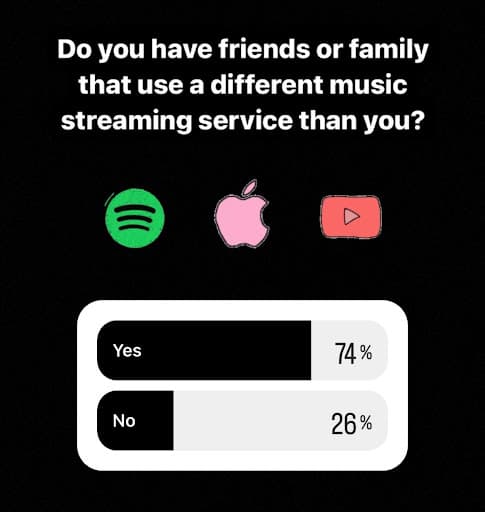
This digital division can split friends, family, and even romantic partners. A poll of 95 college-aged adults found that 74% had friends or family that used a competing music streaming service.

Instagram poll asking “Do you have friends or family that use a different music streaming service than you?” — Yes 74%, No 26%.
The poll as it ran — 95 college-aged respondents.

Interviews with specific individuals uncovered the following:

  • Multiple couples were made up of one Apple Music user and one Spotify user. Some partners were barely willing to download the competing software to manually transfer songs and playlists recommendations to the other, while others simply gave up.
  • Many users refused to even try sharing music with others using competing services, even when the individuals were best friends or romantic partners.

Services already exist that allow users to transfer playlists from one streaming service to another, though they mainly act as account migration tools. Those that allow playlist sharing can turn a playlist into a link that opens on whatever service the recipient uses — proof that the technology backing Harmony is realistic and commercially viable.

What none of them build is a relationship. Their sharing is a link you generate and paste somewhere — anonymous, one-directional, and finished the moment it's opened. There is no friends list, no inbox of playlists from specific people, no record of who you actually trade music with. Sharing is a byproduct of a transfer tool rather than the point of the product.

Hence Harmony's thesis: be the social layer between services, not another migration tool. Keep everyone on the platform they already love; make the playlist the thing that travels.

AlternativeWhat it doesThe gap Harmony targets
TuneMyMusicTransfers libraries between services, and turns a playlist into a shareable page whose visitors can import it to their own library. Sharing is on the free tier; transfers cap at 500 tracks.2The closest thing to Harmony's loop — but it ends at the link. No friends, no inbox, no sender attached to what you receive.
SoundiizRebuilds collections across 40+ services; free Smartlinks route listeners to a playlist on the platform of their choice. Free transfers cap at 200 tracks per playlist.3Smartlinks are a curator-and-artist promotion tool aimed at an audience, not a person, and they point at the live playlist rather than the version you meant to send.
SongShiftiPhone and iPad app that transfers and shares playlists across 13+ services; free to use, with a Pro tier for batch and sync features.4iOS only — it can't reach the Android half of the split it exists to solve.

Competitive landscape verified August 2026. All three now offer some form of cross-platform sharing — the unclaimed ground is sharing built around a standing friendship rather than a link.

  1. Mulligan, M. (2026). Music subscriber market shares Q4 2025: The chess board is set. MIDiA Research. Figures are end-of-2025 global subscriber shares.
  2. Tune My Music. Share playlists between music services and Plans. Recipients can open the playlist or import it to their own library; the free tier includes sharing and a 500-track transfer limit.
  3. Soundiiz. Free music smart links for playlist curators and Pricing & Plans. Smartlinks are free and always resolve to the live version of the source playlist.
  4. SongShift. FAQ. Described by the developer as “a free iPhone and iPad app”; Pro from $6.99/month adds batch setup and playlist sync monitoring.

The Product

Sign in with your streaming service, share playlists with friends on any other.

These demos are live. Each frame renders the same React components as the live web-app. Server calls are swapped for local simulations running on sample data. Because the exhibits import the production components, they update automatically as Harmony evolves.

Playlists — every library, one screen

The home screen puts all of a user's libraries side by side — Spotify, Apple Music, YouTube Music — each in its own branded card with the attribution and link-backs the services require. Search spans all of them at once, because nobody remembers which platform a playlist lives on. Most people use just one, so the demo account starts on Spotify alone; connecting another is the power-user path.

Sharing is the heart of the product. Every row can be sent to friends or turned into a public link, and incoming shares arrive in an inbox where one tap converts the playlist into your own library — with live per-track progress and an honest match report at the end, including which tracks matched loosely and which couldn't be found.

Try it

  • Connect Apple Music or YouTube Music on the Account screen, then find both libraries here, searched as one
  • Open the inbox (badge, top right) and add “car songs” to a library — watch the conversion match track by track
  • Share a playlist to friends, or copy a public link
  • With a second service connected, transfer one of your playlists to it

Playlists

  • HYPE UP

    Nicholas · 42 tracks

    lets goooooooo

  • gym (new)

    Nicholas · 67 tracks

  • Focus

    Nicholas · 38 tracks

  • sleep

    Nicholas · 25 tracks

    the other half of the bio

  • concert prep

    Nicholas · 56 tracks

  • 3am

    Nicholas · 19 tracks

    don't ask

Apple and Apple Music are trademarks of Apple Inc., registered in the U.S. and other countries. Spotify is a trademark of Spotify AB. YouTube and YouTube Music are trademarks of Google LLC. Harmony is not endorsed by or affiliated with any of these services.

Friends — an inbox, not a follower graph

Harmony deliberately has no follower counts and no feed. Friendship is mutual, profiles are visible to friends only, and the list is sorted like an inbox — the people you most recently exchanged music with float to the top, with the running count of playlists exchanged as the row's only metric. The number that matters is between the two of you.

Tapping a row opens that friend's profile: bio, mutual friends, the friendship's stats, and their favorite playlists — up to four pinned picks any friend can save straight into their own library, with the save count flowing back to the owner.

Growth runs through the same screen: search by username for people already on Harmony, or send an invite link to someone who isn't — the link lands them in onboarding and completes the friendship once they've signed in.

Try it

  • Tap David to open the profile — then save one of the favorite playlists to a library
  • Search the add-friend dialog for “zach” or “logan” — each result shows its live relationship state
  • Accept Logan's request and watch the badge update
  • Remove a friend (don't worry — it's sample data)

Account — three services, one identity

Sign-in is service-linking: authenticating with Spotify, Google, or Apple both creates the Harmony identity and connects that service, so there's no separate “connect your accounts” chore. The account screen shows each service's state and lets users link the rest of the lineup — every row identical, one state and one action apiece.

The screen is also where identity gets its color: a Favorite Playlists grid — four slots, Letterboxd's four favorites, for music — that friends see on your profile. Picks come from every linked service through one picker, tiles reorder with two taps instead of a drag library, and each favorite stores a snapshot friends can save into their own libraries.

Apple Music is the exception that proves the rule. Its library permission is a second, browser-local connection that Sign in with Apple doesn't cover, and an earlier build surfaced it right here — a row that could read “Account connected” while the library wasn't, asymmetric against its neighbours and asking for a permission nothing on screen used. It now lives on the playlists screen, prompted at the moment the library is actually read.

Destructive actions get friction proportional to their consequence: removing a friend is a confirm dialog, deleting an account is a quiet text link that demands you type your username. Profile edits stage locally — photo upload with pan/zoom crop, or adopting a photo from a linked service — and commit in one save.

Try it

  • Open the profile edit dialog — display name plus avatar staging
  • Pin a fourth favorite with the grid's pencil, then tap two tiles to swap their spots
  • Open a favorite's name bar — refresh and remove live in its detail dialog
  • Connect Apple Music or YouTube Music — the demo pretends to link it, and its playlists join the Playlists screen
  • Note every service reads the same way: one row, one state, one action
  • Find delete account — deliberately quiet, at the bottom

Account

Nicholas

@nickyg

i like music that will either give you a headache or put you to sleep

Member since July 2026

Favorite Playlists

Connected services

Spotify

Linked July 4, 2026

Connected

Apple Music

Not connected

YouTube Music

Not connected

Apple and Apple Music are trademarks of Apple Inc., registered in the U.S. and other countries. Spotify is a trademark of Spotify AB. YouTube and YouTube Music are trademarks of Google LLC. Harmony is not endorsed by or affiliated with any of these services.

Design & Engineering

The decisions that drove Harmony's development.

Design System first

The design system was built before the screens. Semantic tokens for color, type, spacing, and motion mean every new feature inherits consistent guardrails from the start — decisions about hierarchy, emphasis, and interaction are made once in the system, not re-litigated component by component.

Sign-in doubles as service linking

Supabase Auth identities map to streaming platforms (Google → YouTube Music), with same-email automatic linking handled carefully so adding a second service never forks an account.

Shares are snapshots

A share stores the track list — title, artists, album, ISRC — not a live link. The recipient converts against their own account whenever they choose, the share survives the sender editing or deleting the original, and public playlist links work with no recipient account at all. Favorite playlists pin the same snapshot rows to a profile — one mechanism, three surfaces.

Badges that are actually live

Friend requests and incoming shares light up nav badges via a Supabase Realtime subscription scoped by RLS, reconciled with authoritative recounts so local actions and server pushes can't double-count.

Conversion runs in the browser

Track matching (ISRC first, scored search as fallback) executes client-side with live progress. Apple Music forces this honestly — MusicKit tokens exist only in the browser — and every service gets the same transparent per-track progress as a result.

Links that survive sign-in

Invite and playlist links carry a validated ?next=path through the whole OAuth round-trip, so a first-time visitor lands back on the exact invite they clicked — the growth loop's most fragile step, made boring.

Outcome & Reflection

Where it stands, and what building it taught me.

Harmony works end to end today: sign in with any of the three services, link the others, and share playlists with friends — or with anyone, via public snapshot links — while every profile carries its owner's pinned favorites for friends to save from directly. The primary constraint on growth is external: Spotify and Google keep new applications in development mode with capped user allowlists, so onboarding remains invite-based while the app pursues production API access.

What I learned: more than anything, Harmony reinforced that form follows function. The strongest interfaces weren't the ones that started as visual explorations — they were the ones that grew naturally from carefully defining what the product needed to accomplish. Every decision became an exercise in communicating the maximum amount of information with the minimum amount of visual noise. I also learned that technical constraints aren't always limitations; API capabilities, branding requirements, and platform conventions often become the framework that gives a product its character. Designing within those boundaries consistently led to cleaner, more intuitive solutions than trying to fight them.

What's next: production API access, album reviews, richer sharing with notes, and more.